- Published on
Google Pay Referral Program India 2026: Earn Up to ₹9,000 by Referring Friends
- Authors

- Name
- Admin
Google Pay, widely known as GPay, is one of India's most used UPI payment apps — trusted for everything from splitting bills and paying at local shops to recharging mobiles and booking tickets. Beyond everyday payments, GPay has a referral program that lets you earn direct bank cashback just by inviting friends. Unlike scratch cards or wallet credits, the money goes straight into your linked bank account.
This guide covers exactly how the Google Pay referral program works in India in 2026 — reward amounts, the weekly bonus quest system, eligibility rules, earnings limits, and tips to make sure your referrals actually convert.
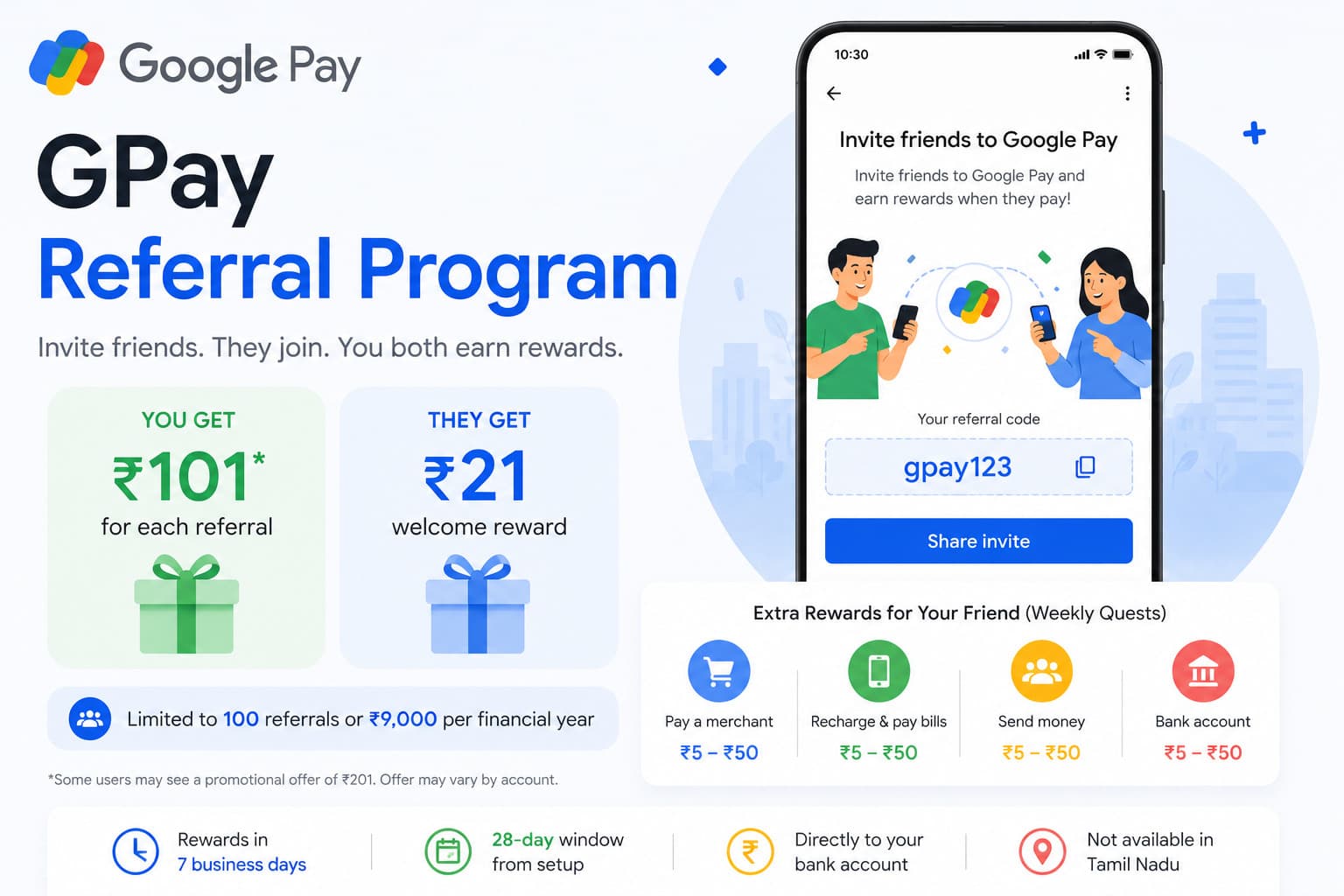
How the Google Pay Referral Program Works
The structure has two layers: an upfront reward when your friend makes their first payment, followed by four weeks of bonus rewards as they continue using the app. This two-stage design is what makes Google Pay's referral program more rewarding than most.
Here is the full flow:
- You share your unique referral link or code with a friend who has never used Google Pay before.
- Your friend installs the app, sets it up with their Indian mobile number, and links a bank account.
- They make their first qualifying payment within 28 days of installing the app.
- You both receive your base cashback reward immediately.
- Your friend receives an automatic invitation to join 4 weekly bonus quests.
- Each week for the next 4 weeks, when your friend completes a qualifying payment, you earn an additional ₹25 cashback.
The rewards are not wallet credits or points — they are real money credited directly to your linked bank account.
How Much Do You Earn?
Base Referral Reward
When your friend makes their first qualifying payment, you earn ₹101 cashback and your friend earns ₹21 cashback.
Some accounts see a promotional bump to ₹201 for the referrer — this depends on ongoing campaigns and your account's current offer. Check the Referrals section of your GPay app to see the exact amount shown for your account before sharing your link. The ₹21 reward for your friend remains standard.
Weekly Bonus Quests
After your friend completes their first transaction, they are invited to join 4 weekly bonus quests. For each of the next 4 weeks, if your friend completes an eligible payment:
- You earn ₹25 cashback per week
- Your friend earns ₹5 to ₹50 cashback per quest
This means the total potential earning per referral goes beyond the base amount. If your friend stays active through all 4 weeks, you can earn:
- ₹101 (base) + ₹25 × 4 (weekly bonus) = up to ₹201 per referral
- If you are on the ₹201 promotional offer: ₹201 + ₹100 = up to ₹301 per referral
The weekly bonus is the most overlooked part of the program. Many users share their link, get the base reward, and stop there — without realising the additional ₹100 available over the following month.
Annual Earnings Cap
Google Pay limits how much you can earn through referrals in a single financial year. The cap is:
- Maximum referrals: 100 per financial year
- Maximum cashback: ₹9,000 per financial year
The financial year runs from April 1 to March 31. Both limits reset on April 1 each year. If you hit either limit — 100 referrals or ₹9,000 in total — you will no longer receive rewards for new referrals until the next financial year begins.
At ₹101 per base referral, you would need 90 successful referrals to approach the ₹9,000 cap. If weekly bonuses are included, the cap becomes relevant much sooner. For most users, the 100-referral limit is the more practical ceiling.
How to Find and Share Your Referral Code
Getting your referral link takes about 30 seconds inside the GPay app:
- Open Google Pay on your Android or iOS device.
- Scroll down to the bottom of the home screen.
- Under the "Invite Friends" section, tap Invite.
- Choose how you want to share — WhatsApp, SMS, email, or copy the link manually.
Alternatively, tap your profile photo in the top-right corner, where you may also find a referral or promotions section depending on your app version.
Your unique referral code is embedded in the link automatically. When your friend uses your link to install and set up GPay, the referral is tracked without any manual steps.
How Your Friend Enters Your Referral Code Manually
If your friend has already installed Google Pay but has not yet made a payment, they can still enter your referral code manually — but timing matters:
- Open Google Pay.
- Tap the profile icon in the top-right corner.
- Tap Referral Code.
- Type in the code exactly as shared.
- If valid, a success screen appears.
- They then make their first qualifying payment within 28 days.
This needs to happen before their first payment. Once they have made any payment on the app, the referral code field is no longer accessible, and the referral cannot be retroactively applied. Make sure your friend enters the code during setup, not after.
What Counts as a Qualifying Payment?
Not every transaction counts toward referral rewards. The following are considered qualifying payments:
- Sending money to another GPay user
- Paying a bill through Google Pay
- Making a purchase on a merchant app or website using a GPay UPI ID
- Transferring money to an external bank account via Google Pay
The following transactions typically do not qualify:
- Payments to users with the same linked bank credentials (essentially paying yourself)
- Insurance premium payments in some cases
- Transactions that do not meet Google Pay's terms and conditions
For the weekly bonus quests, similar rules apply. Your friend needs to complete a standard payment each week — not just open the app.
When Do Rewards Arrive?
There is a slight difference between when rewards are initially visible and when they are actually usable:
Initial credit: Rewards typically appear in your Google Pay Rewards section within 48 hours of your friend completing the qualifying transaction.
Bank transfer: The cashback is usually deposited into your linked bank account within 7 business days from the date the reward was credited. You do not need to do anything to trigger the transfer — it happens automatically.
If the reward does not appear within 7 business days, check that all eligibility conditions were met, then contact Google Pay support through the app.
Who Is Eligible?
For the Referrer (You)
- You must have an active Google Pay account with an Indian mobile number starting with +91.
- You must have earned fewer than 100 referral rewards in the current financial year.
- Your total referral cashback must be below ₹9,000 for the current financial year.
For the Referred Friend
- Must be a completely new Google Pay user — never set up an account with their current mobile number, email ID, or on their current device before.
- Must use an Indian mobile number starting with +91.
- Must link a bank account to the app.
- Must make their first qualifying payment within 28 days of installing the app using your referral code.
- Must be using a device not previously associated with a GPay account.
Important: If your friend has ever created a GPay account — even briefly, even years ago — using their current mobile number or device, they are not eligible. Refurbished phones where the previous owner used GPay can also cause referral failures, since the device itself may be flagged.
Regional Restriction
The referral program is not available in Tamil Nadu due to the Tamil Nadu Prize Schemes (Prohibition) Act of 1979, which restricts certain prize and reward schemes. Users with Tamil Nadu-registered numbers cannot participate in this program.
Why the 28-Day Window Matters More Than Most People Think
One of the most common reasons referrals fail is the 28-day window. Many users share their link, their friend installs the app, and then both forget about it. Weeks later, the friend finally makes a payment — but the 28-day window has already closed.
The timer starts from the moment your friend installs and sets up the app with your referral code, not from when you sent the link. If your friend has the app sitting idle for a month before making a payment, neither of you gets the reward.
The fix is simple: when you share your link, tell your friend directly — "Make your first payment within the next 28 days, otherwise we both miss the bonus." A follow-up reminder at day 20 can make the difference between getting the reward and losing it.
Tips to Maximise Your Referral Earnings
Target people who are not already on GPay. Sounds obvious, but it is easy to share a link with someone who quietly already has an account. Ask before sharing.
Share during situations where payment is immediate. If you are splitting a restaurant bill with a friend who pays cash, offer to show them how to use GPay right there. They set up the app, pay their share using GPay for the first time, and the referral completes instantly.
Remind about the weekly quests. After your friend makes their first payment and receives the quest invitation, remind them that completing one payment per week for 4 weeks earns you both additional cashback. Many people ignore the quest invitation without realising it benefits both sides.
Track your referral status. In the GPay app, go to the bottom of the screen, tap Referrals, and you can see the status of each referral — who has signed up, who has completed their first payment, and what you have earned. Checking this regularly helps you follow up with the right people at the right time.
Keep your annual cap in mind. If you are approaching 100 referrals or ₹9,000 in earnings as March 31 approaches, be aware that your counter resets on April 1. Plan accordingly — if you are close to the limit, you may want to hold off on sharing new referrals until the new financial year begins.
Google Pay Referral vs Other UPI Apps
To put the Google Pay referral program in context, here is how it compares to similar programs:
PhonePe — offers referral cashback that varies by campaign. Rewards are typically credited as scratch cards or direct cashback, but the structure changes frequently.
Paytm — has historically run referral campaigns with wallet cashback, but the terms and amounts fluctuate significantly. Paytm cashback is often credited to the Paytm wallet rather than directly to a bank account.
BHIM — runs periodic referral campaigns but without a consistent reward structure. Cashback amounts are lower and less predictable.
Google Pay's strength in this comparison is consistency and directness. The ₹101 base reward, the ₹25 weekly bonus structure, and the direct bank account deposit make it one of the more transparent and predictable referral programs among Indian UPI apps.
Final Thoughts
The Google Pay referral program is one of the more straightforward ways to earn real cashback in India's fintech space. The money goes directly to your bank account, the conditions are clear, and the two-stage reward structure — base payout plus weekly bonuses — makes each referral worth significantly more than a one-time payment.
The key is making sure your friend uses your code before their first payment and completes it within 28 days. Beyond that, the app handles everything automatically. With up to 100 referrals allowed per year and a potential of ₹9,000 in earnings, it rewards consistent effort without requiring anything complicated.
If you have friends or family who have been meaning to switch to digital payments or explore UPI beyond their current app, this is one of the better reasons to make that introduction.